Restoring a Commodore PET Cassette via TAP
Introduction
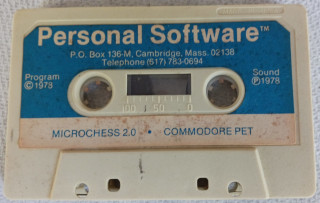 I was gifted/donated a Commodore PET 2001 and inside the
donor included a cassette. They thought the cassette had their own
personal programs on it and asked, if I was able to get the computer
working, could I get they're programs back to them.
I was gifted/donated a Commodore PET 2001 and inside the
donor included a cassette. They thought the cassette had their own
personal programs on it and asked, if I was able to get the computer
working, could I get they're programs back to them.
This blog post is more like a journal of my attempts to do just that. I'm thinking I'm also going to include some videos and have those hosted over on my Makertube channel.
Overview
The cassette in questionis labeled as Microchess 2.0 by Peter Jennings (already on Internet Archive):
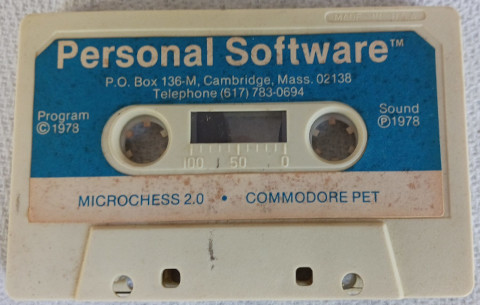
So perhaps the donor overwrote this cassette? Or maybe used side 2? Looking at the top of the cassette,
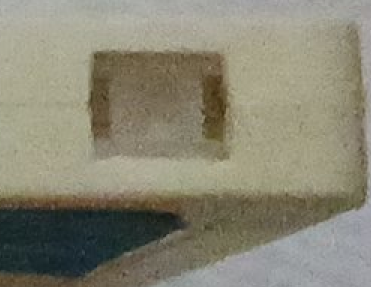
it seems both tabs are in tact (verified with a the point of a stylus) so the cassette is not write protected. You can see in this blown-up image, there is a clear plastic tab, not the conventional one matching the cassette case, allowing writing. Strange for a commercial product. I don't believe the PET's cassette deck used any sort of light-mechanism to detect writable cassettes, so I'm presuming this tape is fully able to be written.
The Plan
I was reminded of the Noel's Retro Lab video where Noel did something similar with a TI-99/4a. The issue is though, Noel had a functioning TI-99 to use and test with…I don't have a functioning PET 2001.
I could buy a Mini-PET but none of the seller links seem to have it. The Mini-PET II is said to be on its way, but I've seen it. Plus, to be honest, I think we're all having financial difficulties so buying this is probably not the path for me.
So my approach is to follow Noel's method to:
- Record the tape to a WAV file on my workstation (probably via Audacity).
- Try and convert the WAV file to a .TAP image. Folks on Mastodon have offered up a few suggestions already.
- Load the .TAP into VICE. There is one potential hiccup though…the earliest PET VICE models is the 2001-8N which "…had a conventional, full-sized keyboard and no longer sported the built-in cassette recorder. The kernel ROM was upgraded to add support for Commodore's newly introduced disk drive line." (src: Wikipedia) So I'm not absolutely sure even this will work.
And also like Noel's work, I'm not going to start with this cassette. I need to find, or create, a cassette with a program for me to test with. Since I don't have a working PET or datasette, it looks like I'll need to create one. So my approach will now be:
- Create a .TAP file via VICE's PET 2001-8N emulator.
- Convert the .TAP to a WAV file
- Record the WAV onto a cassette.
- Record the WAV back into a WAV file.
- Convert the WAV to a .TAP file
- Test the .TAP in VICE.
This may seem redundant, but I need to verify the tape recorder functionality and volume settings. I also need to verify the tools which convert WAV to TAP and vice versa.
How to Monitor My Progress
I will add posts to this log/journal as I make progress, run tests,
etc. As part of that, I'll include name tags to the dates and post
the appropriate link on the Mastodon thread.
Progress
20260324
Created the blog post and started a Mastodon progress thread. Also got some links to tools for steps 2 and 5. Finally, create the Makertube Channel for any videos attached to the project.
I also created a simple BASICv4 program on VICE by launching xpet
-model 2001:
5 PRINT "{clr}";
10 FOR I= 1 to 10
20 PRINT "HELLO COMMODORE PET"
30 NEXT I
saved it to a .TAP file, quit the emulator and then restart it to test the .TAP file.
Here is the video on Makertube. This completes step #1.